
24 May 202610 min read
You still have to find every receipt yourself.
How a bookkeeping itch I couldn't ignore turned into a product, and why the missing link isn't the tool that does the books, but the one that feeds it.

Founder, Billpal
About three years ago I started my own business. I had a laundry list of things I wanted to do: projects I'd been putting off for years, clients I wanted to work with, and finally building things, not slides. Bookkeeping was not on the list. Like most people who go independent, I figured out pretty quickly that the admin side of running a business is its own job, and that nobody is going to do it for you.
Back then Google Sheets felt like the obvious place to start. Free, flexible, already knew it inside out. And I genuinely meant to keep it tidy. That lasted about two months. In my defense, I am structured enough when the work is interesting. I am sloppy when it isn't. Bookkeeping never came close to meeting that bar.
So within a few months my receipts were everywhere. In my inbox. In my downloads. In the third drawer of my desk. In the glove compartment of a car I no longer owned by the time I went looking for them. I had a folder on my desktop called Receipts 2023. It was, mostly, empty. Go figure.
The end of every month was the same. A few hours of digging, a few hours of turning the pile into something my CPA could actually use. He has always filed the taxes. I just prepared as much as I could in a spreadsheet, mostly to save some money. But what was always mine was the collection: find it, sort it, hand it over. Tax season was that, multiplied. A long weekend of forensic accounting, a CPA who quietly judged me, and, if shit hit the fan, a small, expensive surprise from the tax office.
I tell people now that I didn't start a business to do bookkeeping. That gets a laugh, but it is also literally true. None of us did. And yet we all end up here.

The tools were fine. The inputs weren't.
So I did the responsible thing and went looking for a proper setup.
Outsourcing was tempting but off the table at the time. Quotes started around €150–200 a month, which is a lot for someone in month four of a new business whose entire ask is please type my expenses into a spreadsheet so I can pass it on to my tax guy. In the early days, when every euro is allocated three times over, the math just didn't work. And back then, the job was too small to justify putting a person on it anyway.
So I went looking for software instead. I tried QuickBooks. FreshBooks. Sevdesk. Bonsai. Wave. Xero. Pick one, I almost certainly had a subscription at some point.
Don't get me wrong, they're good products. That isn't the issue. The issue is that they were all built for accountants. Chart of accounts. Double-entry. Assets vs. liabilities vs. equity. P&L statements. None of it is wrong. It's all standard accounting, professionally done. It's just that I am not an accountant, and I never wanted to become one. The whole point of running a small business is that you get to choose what you spend your day on. Most accounting tools quietly assume the opposite. Which is the long way of saying: accounting software is built for accountants. The rest of us are being asked to think like one. That's the bug.
Accounting software is built for accountants. The rest of us are being asked to think like one. That's the bug.
And the irony was that, despite all this functionality, these tools caused more work, not less. Now I had expenses to categorize, a customer to create, a supplier to add, records to link. The tool that was supposed to take work away was giving me more of it, just in a nicer UI.
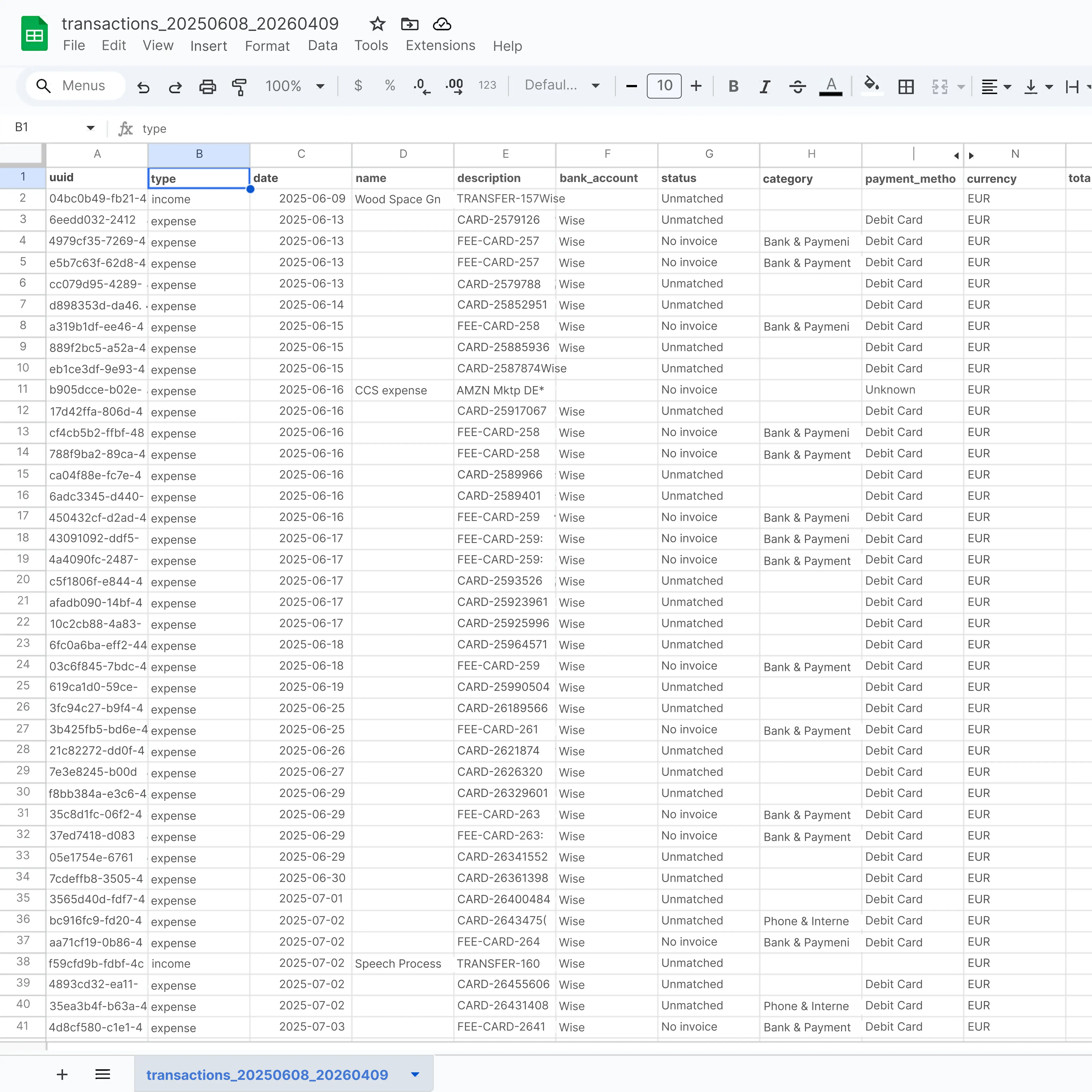
A few months in, I quietly canceled every sub and went back to spreadsheets. Not because the tools were bad. Because whichever one I opened, I was still the one doing the accounting. For what I actually needed, a grid was faster. People like to bash on Excel, but it is a genuinely flexible piece of software, and when your job is just write down what comes in and what goes out, very little beats a blank grid.
What no one seems to get right
I still didn't want to do the accounting. And even if I wanted to, I would not know how. I am perfectly happy paying someone to tell me what's deductible and what isn't, and to file my taxes so I don't end up in jail.
You can DIY some of it. Keep a spreadsheet, have your shit together, save a bit of money. At some point everyone still needs an expert. That's the accounting. Hire it out. What no bookkeeper can take off your plate is the pile. You still have to find every receipt yourself before anyone else can touch it.
Outsourcing doesn't save you the worst part. You still have to find every receipt yourself.
Every accounting tool has some version of the same tagline: spend less time on your finances and more time running your business. It's the right promise. On the ledger side, most of them keep it. It breaks upstream. Once you actually use one, you realize the typing didn't go anywhere. It just moved from a spreadsheet into a web app. Even the good OCR still misses half the file. If you're lucky. So you type.
But that's the thing: the clean P&L isn't even mine to produce. My accountant does that, and does it better than I ever would. What's missing is the layer in front – the part that records what happened and hands it over clean. Get that right and everyone wins: I stop typing, and they get to skip the part of the job nobody went to school for. They shouldn't have to copy line items off a PDF either – it's simply not efficient.
What I actually need from a tool isn't help producing the books. It's help collecting what happened, as automatically as possible, in a shape my tax advisor can pick up and finish – without either of us having to type anything by hand. That should be the entire job. At least that's how I see it.
Sure, what's convenient if you use an all-in-one solution is a proper invoice generator. Neatly saved right in the tool. But honestly I write three or four invoices a month from a Word template. Swap the client name, swap the line items, save as PDF. A minute, maybe two. A half-decent template is enough. What I'd actually want from a tool is the inverse: take the invoice I already wrote, read it, pull out the data, file it without me retyping a thing.
But that isn't even the worst part. The real volume is on the other side of the fence: bills coming in. And the intake workflow is grim:
- You still search your own inbox. Tools that ingest invoices already exist. They start with you: forward this email, download this PDF, drag it into a box. "Just forward your bills to this address" sounds clever until you have to remember each one. You don't. The only version that actually removes the work is one that reads it straight out of the inbox.
- The PDF lands in the tool. You still type. Vendor, date, amount, VAT, currency. By hand. We've had OCR for fifteen years and good language models for two, and somehow this is still my job. Why?
- You set up the records yourself. Every new vendor is a fresh form. A tool meant to remove paperwork starts by giving you more. But now it's digital. Cool.
Most of this exists, I'm convinced, because of when these tools were originally built. Before REST APIs were standard. Before language models could parse a PDF. So they orchestrated the only thing they could orchestrate at the time: a place for you to type everything in by hand. The interfaces have got prettier since. The integrations have multiplied. But the basic shape of the work hasn't changed. Find the document, type the document, file the document. The ledger was never going to fix that. It isn't supposed to.
The problem is that finding documents is still my task – my accountant cannot do this for me. And even if they give me some client portal where I can upload my bills, that only solves their side – it consolidates their intake. It does nothing for the part that actually hurts: the digging is still mine. And every small business owner knows that feeling, it's excruciating. So the real question is how we make this less painful for all of us – offload as much as possible to a machine, so I can spend less time searching, typing and filing, and more time on the question that actually matters: how do I pay less tax and keep more cash to grow the business?
None of which has to be true anymore. What I'd want from a tool today is the minimum interface to keep track of things, plus an intelligent operator behind it doing the typing on my behalf. Like a junior bookkeeper who quietly takes whatever you throw at them, types it neatly into a spreadsheet, and ships it off to your accountant at the end of the month. The ledger is the software. The operator in front of it is still you. That's the bug I went looking to fix.
Taking matters into my own hands
One Sunday evening, the kind you'd rather spend on Netflix, I sat down with a pen and wrote down what I was actually doing. Every step. With a timer.
Three things on the list:
- Finding the invoices. Most lived in my inbox as attachments. A few were behind login screens, sent as "view your invoice" links. Digging them out took hours.
- Extracting the data. Open each PDF, find the amount, check the VAT, note whether it was reverse charge. Per document, a few minutes. Across 30+ documents: hours, not minutes.
- Matching them to transactions. The bank export is the base layer – without it, you don't even know what you're looking for. Luckily, most of this already flows into the ledger. The tools are quite good at making sense of it, and at reconciling.
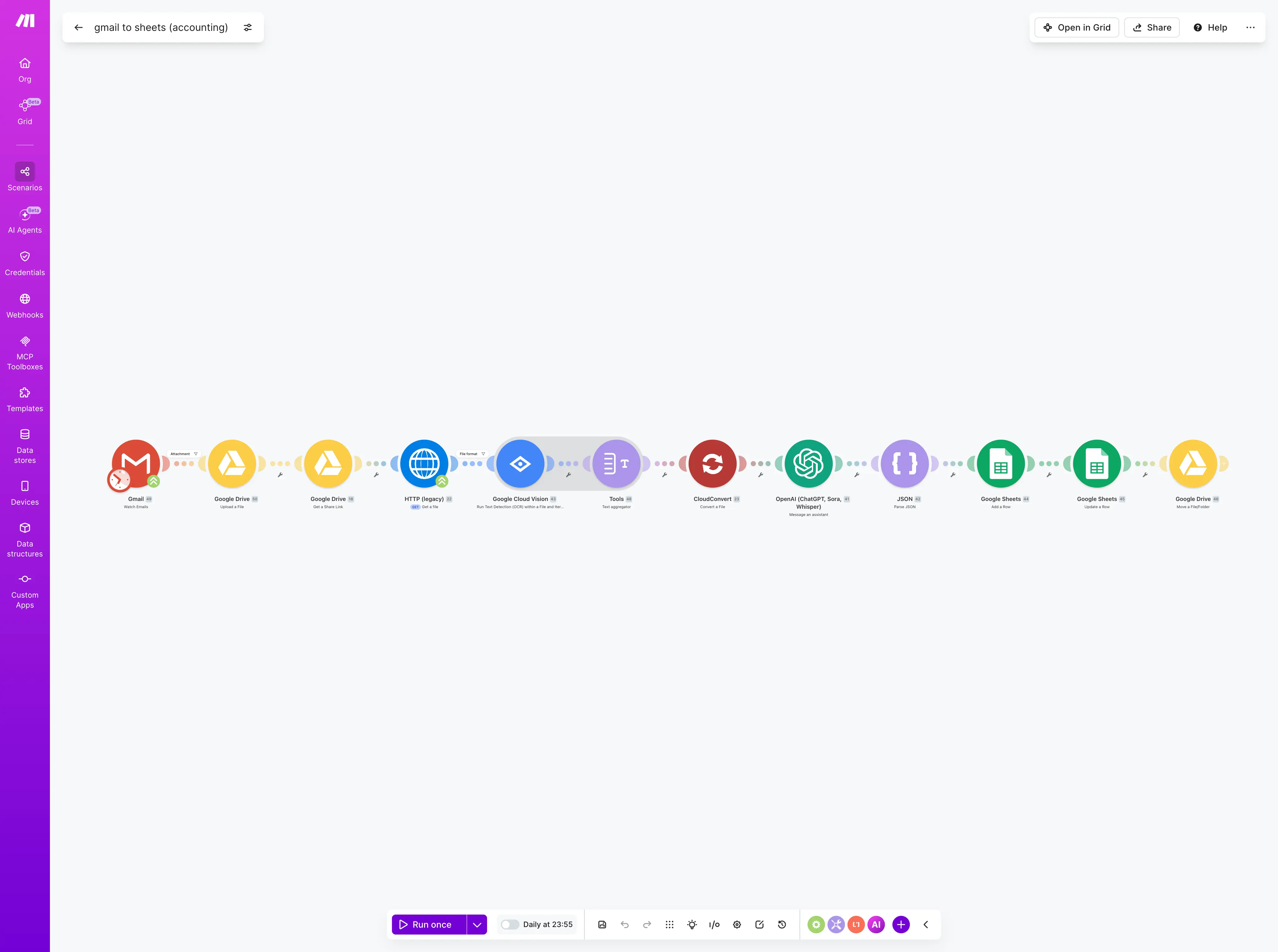
So I started chipping away at the first two. First, Gmail labels that auto-grouped anything that looked like an invoice. Then a step that pulled new attachments into Google Drive. Then an LLM that screenshotted each PDF and pulled out the line items – this was 2023, before models could read PDFs directly. Seventy percent accurate on a good day. Good enough to be useful.
Then a categorizer. I didn't call it a chart of accounts, because I didn't want one. Just income and expense buckets – in plain words that anyone could read.
Then I sent my accountant the documents, along with the bank CSV, and let the ledger reconcile against the bank account.
That's when it dropped from a Sunday evening to about ten minutes a month.
Billpal was born. It just wasn't called that at the time.
What this looks like now
Two years in, this has turned into a real product. The shape is the same as that Sunday-evening list, minus the part the ledger already does. Get the document out of the place it already lives. Read it. Hand it over clean.
It starts with email. Whenever a new attachment lands in your inbox that looks like an invoice or a receipt, Billpal pulls it in. You don't forward it. You don't download it and upload it somewhere else. It just arrives. Just the attachment – the rest of the mail isn't the point. Everything that doesn't fit the pattern is ignored. The dashboard fills up on its own. No more digging at the end of the month. By the time you log in, the invoices are already there.
The same thing runs the other way. Invoices you've sent to clients, sitting in your Sent folder, get pulled in like the incoming ones. Both directions. You still never type them in.
You never type anything in the tool. Once a document lands, it gets filed.
Every document gets parsed for the obvious fields – amount, date, VAT, currency, line items. And some less obvious ones too, like reverse charge or tax rate splits – the kind your CPA will quietly thank you for. The supplier or customer behind it gets identified along the way. If it already exists, the document is linked. If not, a new one is created. You don't fill in a vendor form. The lists build themselves out of what comes in. Of course you can edit them – you just shouldn't have to.
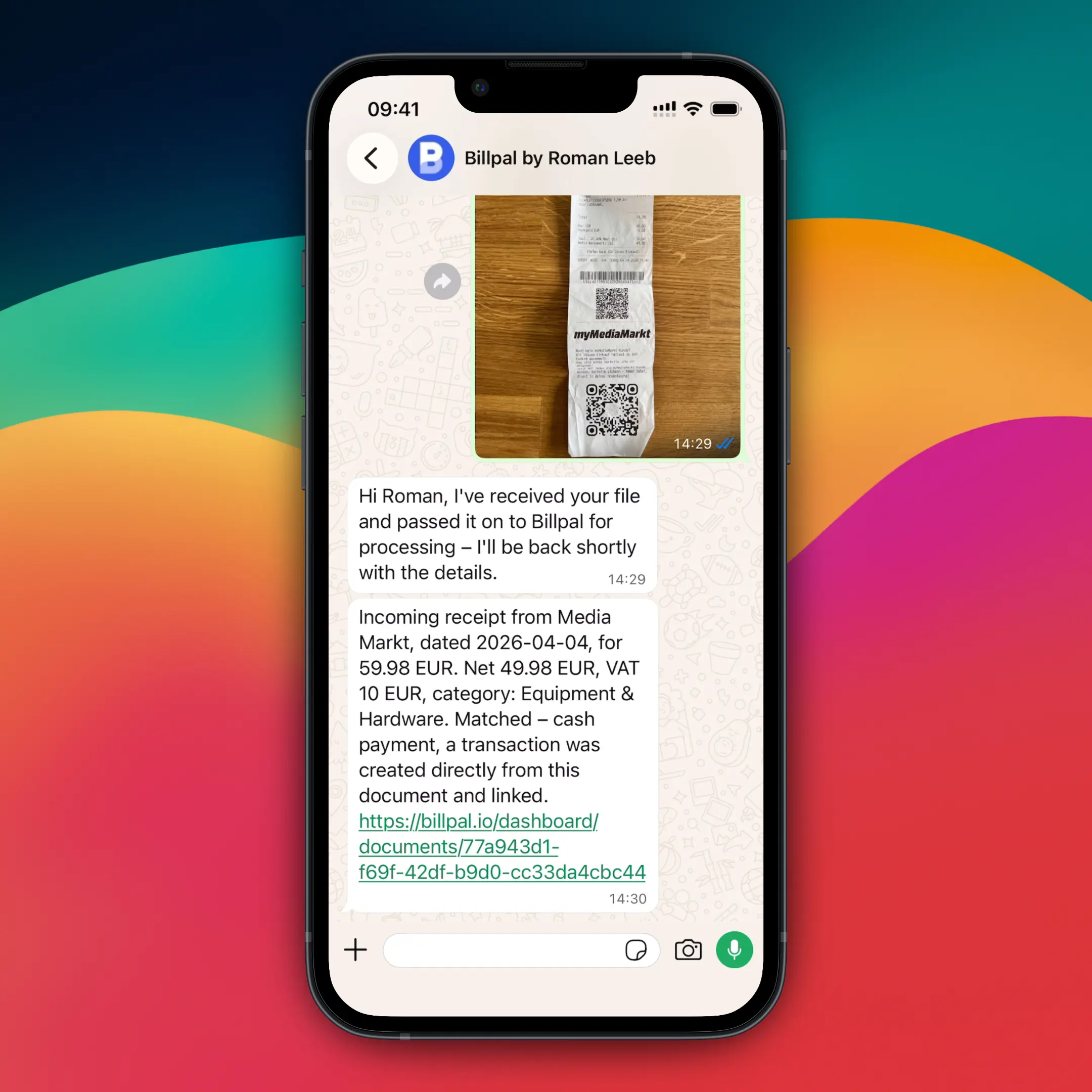
And for the small minority of things that still arrive on paper – restaurant tabs, taxi slips, the occasional thermal-print disaster the cashier hands you – there's a WhatsApp number you can send photos to. The pipeline takes it from there. The reason it's WhatsApp specifically, and not its own app, is that I'm already in WhatsApp twenty times a day. I didn't want another app for this, and I doubt you do either.
The leftover was the other kind. The view your invoice email with no attachment. I'd still have to log in and download it myself. I tried the tools that promised connectors for that. They worked, somewhat, until the vendor moved a button or renamed a class, which they do constantly. So I stopped playing that game and tasked an agent with grabbing the damn invoice. Like it was 2026.
These days, the prep looks like this. Near the end of the month, I open Billpal, glance at what's there, review the few docs that need my attention, hit Export, and email it to my CPA. Maybe ten minutes. He likes it too, because he no longer has to type any of it either.
Which is the whole point, really. A good CPA is worth every penny, and that hasn't changed for me. But you want them for the parts that actually need a brain: the should I incorporate, the year-end optimization, the what's actually deductible questions where the answer matters and the stakes are real. Not for the data entry a machine should be handling by now.
Billpal will not generate a P&L. It will not file your taxes. It is not trying to be your accountant, and it isn't trying to replace one either. If you need full accounting software – double-entry, payroll, inventory, audit trails – then QBO or Xero are great. Use them. They were built for it. Billpal sits in front of them. It gets the documents out of your inbox, reads them, and hands the ledger a clean stream of structured data. Everybody wins.
And if your business looks roughly like mine, where the actual work is something else and bookkeeping is the side of the desk you'd rather never look at again, this is what I built for me. Less time on finances, more time on the business. And after two years of building toward that line, I can now finally say it without rolling my eyes.
Thanks for reading. If any of this resonated, the easiest way to get in touch is just hey@billpal.io. It goes directly to me.
– Roman